

Shopify web development isn't just about clicking buttons and picking a theme. It's about building an online store that converts browsers into buyers, handles real inventory, and grows with your business. For small Australian eCommerce businesses, understanding what shopify web development actually involves can mean the difference between launching a store that makes sales and one that sits collecting digital dust. The gap between those outcomes often comes down to structure, strategy, and knowing which technical elements matter most for your specific business model.
What Shopify Web Development Actually Covers
Shopify web development encompasses everything from theme customisation and checkout optimisation to app integration and performance tuning.
It's not website building in the traditional sense.
You're working within Shopify's ecosystem, which means you're balancing platform constraints with customisation opportunities.
The work breaks down into three core areas:
Frontend development handles what customers see and interact with. This includes theme selection or custom build, product page layouts, navigation structure, mobile responsiveness, and visual consistency across your brand. A study by Baymard Institute found that 69.82% of shopping carts are abandoned, with poor user experience being a major contributor.
Backend configuration manages how your store operates behind the scenes. Inventory management, shipping zone setup, tax calculations, payment gateway integration, and order fulfilment workflows all live here. Get this wrong and you'll spend hours manually fixing orders instead of growing your business.
Technical optimisation bridges the gap between functional and profitable. Page speed, SEO structure, conversion rate optimisation, analytics implementation, and accessibility standards determine whether your traffic turns into revenue.

The Liquid Templating Language
Shopify runs on Liquid, a templating language created by Shopify to build dynamic content.
If you've ever wondered how product details automatically populate or how collection pages update when you add new items, that's Liquid at work.
You don't need to become a Liquid expert to run a successful Shopify store, but understanding its role helps you make smarter decisions about customisation. When you want to display product variants differently, add custom sections to your homepage, or create unique page layouts, you're working with Liquid code.
Mastering Shopify’s Liquid framework requires patience, but the payoff is complete control over how your store presents information.
Most small businesses find a middle ground by using well-coded themes and hiring developers for specific customisations rather than building everything from scratch.
When DIY Makes Sense and When It Doesn't
Shopify's promise of "anyone can build a store" is technically true but practically misleading.
You can absolutely launch a basic store yourself using a theme and the platform's built-in tools.
Where things get complicated is when you need something the theme doesn't offer out of the box.
DIY works well when you:
- Have a straightforward product catalogue with minimal variation
- Can work within a theme's existing structure
- Have time to learn through trial and error
- Don't need complex functionality like subscriptions or custom calculators
- Are comfortable troubleshooting technical issues
Professional development becomes necessary when you:
- Need custom functionality that apps can't provide
- Want a unique design that stands out from template competitors
- Require complex integrations with inventory, accounting, or CRM systems
- Value time and opportunity cost over upfront savings
- Need strategic guidance on conversion optimisation
The Shopify web designer community in Australia has grown significantly because business owners realise their time is better spent on product development and marketing than debugging code.
A 2025 survey by eCommerce Platforms found that businesses using professional development services achieved an average 40% higher conversion rate than purely DIY builds in their first year.
The Real Cost of Free Themes
Free Shopify themes seem like an obvious choice when you're watching your budget.
They're functional, supported by Shopify, and get you online quickly.
But they come with hidden costs that compound over time.
Free themes typically lack advanced customisation options, meaning you'll hit limitations faster. They're used by thousands of other stores, making differentiation harder. Support is minimal compared to premium themes, and they rarely include the conversion-focused features that paid themes build in.
You'll often spend more on apps to fill functionality gaps than you would have spent on a premium theme with those features included.
Premium themes from established developers cost between $250-$400 AUD, but they typically include features worth thousands if built custom. The question isn't whether you can afford a premium theme; it's whether you can afford the opportunity cost of a free one.
Essential Technical Elements That Impact Sales

Page speed directly correlates with conversion rates, and Shopify stores are no exception.
Google reports that as page load time increases from one to three seconds, bounce probability increases by 32%.
For eCommerce, that's not just lost traffic; it's lost revenue.
Shopify web development that prioritises performance focuses on image optimisation, lazy loading, minimal app installations, and clean code. Every app you install adds JavaScript and CSS files that slow your store down. A store with fifteen apps might be functionally rich but conversion-poor simply because it takes six seconds to load.
The goal is to keep your store under two seconds on mobile, which requires deliberate technical choices from day one.
| Performance Factor | Impact on Conversion | Implementation Priority |
|---|---|---|
| Page load speed | High (direct correlation) | Critical |
| Mobile responsiveness | Very high (60%+ mobile traffic) | Critical |
| Image optimisation | Medium (affects speed) | High |
| Checkout simplicity | Very high (reduces abandonment) | Critical |
| Navigation clarity | High (affects bounce rate) | High |
Mobile Experience Is Not Optional
Mobile traffic accounts for over 60% of eCommerce visits in Australia, according to Statista 2025 data.
If your Shopify store doesn't work flawlessly on mobile, you're losing the majority of your potential customers.
Mobile optimisation goes beyond responsive design. It requires thinking about thumb-friendly navigation, simplified checkout flows, readable text without zooming, and touch-target sizing that prevents mis-taps.
Many themes claim to be mobile-responsive but fail the usability test. Responsive means the layout adjusts to screen size. Mobile-optimised means the entire experience is designed for how people actually use their phones.
Testing your store on real devices, not just browser simulators, reveals issues you'd never catch otherwise. The Talk Shop community regularly shares mobile optimisation insights from merchants who've tested extensively across devices and user scenarios.
Choosing Between Theme Customisation and Custom Build
Most small Australian eCommerce businesses don't need a fully custom Shopify build.
Theme customisation delivers 80% of what you need at 20% of the cost.
The decision framework is straightforward but requires honest assessment of your business needs.
Theme customisation works when:
Your product catalogue fits standard eCommerce patterns. You can achieve brand differentiation through content, photography, and minor design tweaks. Your budget is under $10,000 AUD. You need to launch within weeks, not months.
Custom builds make sense when:
You have unique selling processes that standard themes can't accommodate. Your brand requires a completely distinctive visual identity. You have complex backend requirements or integrations. Budget is available ($20,000+ AUD) and timeline is flexible (3+ months).
For most small businesses, a well-chosen theme with strategic customisation delivers the best return. You get professional design foundations, ongoing theme updates, and developer support while maintaining budget for other critical areas like marketing and inventory.
The key is working with developers who understand when to recommend theme customisation versus rebuilding from scratch. At Kida Digital, the core Shopify package is designed to cover everything a new eCommerce business needs to launch within four weeks with clarity, momentum, and a clear strategy, using conversion-focused theme customisation rather than unnecessary custom code.
App Integration Strategy
Shopify's App Store contains over 8,000 apps, and choosing the right ones requires more strategy than you'd think.
Every app adds cost, potential security vulnerabilities, code weight, and maintenance overhead.
The businesses that succeed with apps follow a clear principle: only install apps that directly increase revenue or significantly reduce operational time.
Start with essential functionality: product reviews, email marketing, inventory management if you have complex stock needs, and perhaps a customer service tool. That's typically four to five apps maximum for a new store.
Resist the temptation to install apps "just in case" or because they sound helpful. Each app is another integration point that can break during updates, another monthly fee, and another thing to monitor.
Shopify Partner apps from verified developers generally offer better reliability and support than newer, unproven options, though that's not an absolute rule.
SEO Foundations Built During Development
Search engine optimisation isn't something you add after launching your Shopify store.
It's built into the structure during development.
URL structure, heading hierarchy, meta descriptions, image alt text, schema markup, and internal linking all need planning before you start adding products. Fixing these elements after launch is possible but exponentially more time-consuming than doing it right initially.
Shopify's SEO capabilities are strong out of the box, but they require configuration. The platform handles technical SEO like mobile-friendliness, SSL certificates, and sitemap generation automatically. What it can't do is write your meta descriptions, optimise your product titles for search intent, or structure your collections strategically.
Product page optimisation follows specific patterns that balance search visibility with conversion focus. SEO optimisation for Shopify product pages requires understanding how search engines interpret product information and how customers make purchase decisions.
Technical SEO Elements Developers Should Handle
Structured data implementation helps Google understand your product information, pricing, availability, and reviews. This enables rich snippets in search results, which significantly improve click-through rates.
XML sitemap optimisation ensures search engines discover all your important pages efficiently. Shopify generates sitemaps automatically, but configuration determines what gets included and prioritised.
Page speed optimisation is both a ranking factor and conversion factor. Core Web Vitals, Google's performance metrics, directly impact search visibility and user experience.
Canonical URL management prevents duplicate content issues when products appear in multiple collections. Shopify handles this reasonably well by default, but custom configurations require developer attention.
These elements require technical knowledge beyond basic platform use. They're why working with developers who understand both Shopify development and SEO principles delivers better long-term results.
Development Timeline Expectations
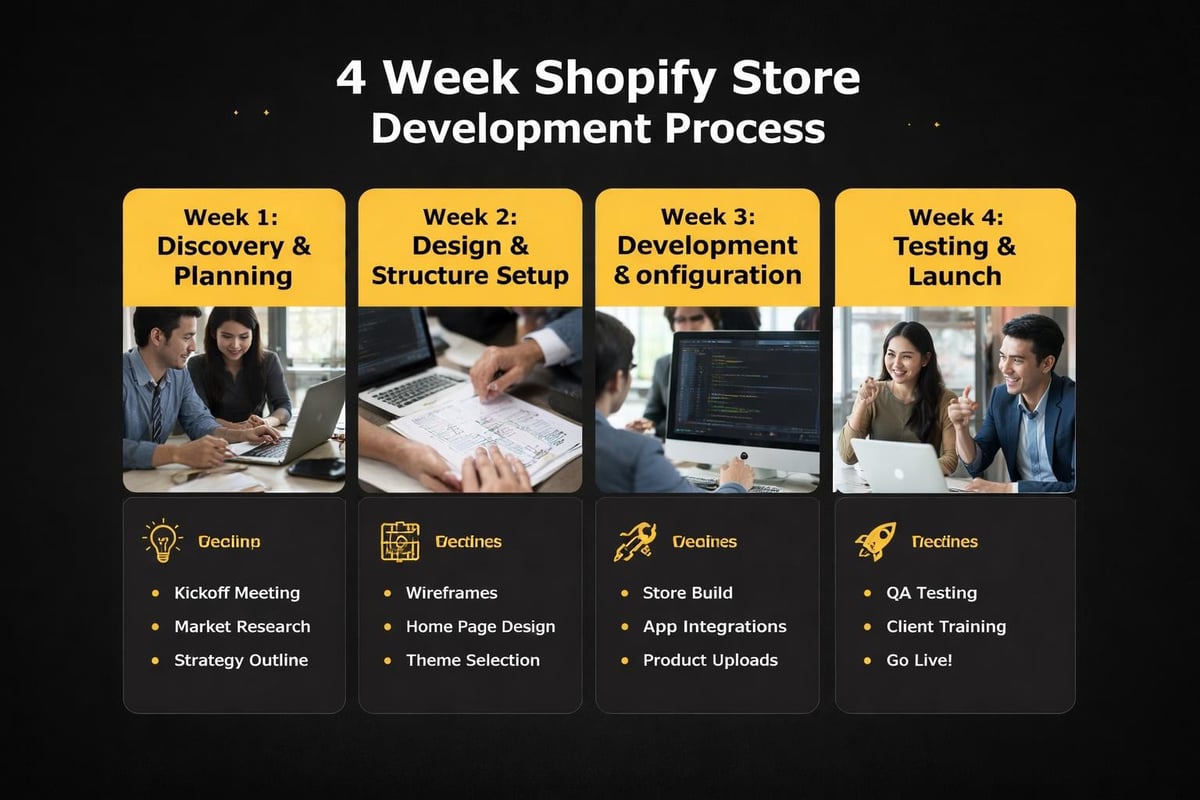
Realistic timeline expectations prevent frustration and help you plan your launch properly.
A functional Shopify store can technically go live in days, but a strategic, conversion-optimised store needs weeks.
The four-week timeline structure works well for small businesses when properly planned and executed.
Week one focuses on discovery, strategy, and planning. This includes understanding your business model, target audience, product catalogue structure, and competitive positioning. Technical setup begins with domain configuration, initial theme installation, and basic settings.
Week two handles design customisation and structural setup. Homepage layout, collection page structure, product page templates, navigation menu, and footer information all get configured. Content requirements become clear during this phase.
Week three concentrates on development and configuration. App installations, payment gateway setup, shipping zone configuration, tax settings, checkout optimisation, and email notifications all get finalised. Product upload begins if you have catalogue ready.
Week four is testing, refinement, and launch preparation. Mobile testing, checkout flow testing, order fulfilment workflow verification, analytics setup, and final content review happen here.
This timeline assumes you have content, product information, and photography ready. If you're still shooting product photos or writing descriptions, add two to three weeks minimum.
The Cost of Rushing Development
Fast launches sound appealing until you're fixing problems that cost more than doing it right initially.
Rushed development typically skips testing, ignores mobile optimisation, uses generic content, and implements minimal SEO structure.
The result is a store that looks fine on desktop but breaks on mobile, has no search visibility, and converts poorly because the checkout flow wasn't tested properly. Fixing these issues post-launch while also trying to run your business creates unnecessary stress and costs.
Developing on Shopify properly the first time is faster overall than launching quickly and rebuilding six months later.
Working With Shopify Developers Effectively
Getting good results from developers requires clear communication and realistic expectations.
Developers aren't mind readers, and "make it look good" isn't a brief.
The businesses that get the best outcomes from shopify web development provide clear direction on brand guidelines, share examples of what they like and dislike, understand their target customer deeply, and make decisions promptly when developers present options.
Preparing before engaging a developer saves time and money. Have your brand colours and fonts defined. Know what products you're selling and how they're organised. Understand your shipping strategy. Have content and images ready or at least in progress.
The more prepared you are, the faster and more cost-effectively the development process moves. When developers wait for content, decisions, or product information, your timeline extends and costs increase.
Communication frequency matters too. Weekly check-ins work well for most projects. Daily messages create interruption overhead, while monthly updates lose momentum.
Questions to Ask Before Hiring
Not all Shopify developers are equal in skill, experience, or approach.
Can you show examples of stores you've built in my industry? Industry-specific experience means they understand common challenges and solutions.
What's included in your quoted price? Some developers quote theme customisation only, leaving you to handle apps, settings, and configuration yourself.
How do you handle revisions and changes? Understanding the revision process prevents surprises.
What happens after launch if something breaks? Post-launch support varies dramatically between developers.
Do you optimise for conversion or just implement designs? This question reveals whether they think strategically or just execute tasks.
The Shopify developer community offers guidance on finding qualified developers, but personal referrals from other small business owners often yield the most reliable results.
Platform Limitations Worth Knowing
Shopify is powerful but not infinitely flexible.
Understanding its limitations before you commit prevents disappointment later.
Checkout customisation is limited unless you're on Shopify Plus, which costs significantly more. You can't completely rebuild the checkout flow or add custom fields easily on standard plans.
Database structure is fixed. You can't create completely custom product types or data relationships beyond Shopify's built-in framework.
Hosting is locked in. Unlike WordPress or custom platforms, you can't move your Shopify store to different hosting. You're committed to Shopify's infrastructure and pricing.
Content management is less flexible than dedicated CMS platforms. Building complex content-heavy sites with blogs, resources, and multiple content types is possible but clunkier than purpose-built CMS platforms.
These limitations rarely matter for straightforward eCommerce, which is what most small businesses need. They become relevant when you have unusual requirements or try to use Shopify for things it wasn't designed to do.
If your business model requires extensive customisation beyond standard eCommerce patterns, exploring advanced Shopify development techniques or considering whether Shopify Plus or alternative platforms better suit your needs makes sense.
Measuring Development Success
Launching isn't success; converting visitors into customers is.
Your shopify web development should be measured against business outcomes, not just aesthetics.
Key metrics to track from day one:
- Conversion rate (visitors to purchasers)
- Average order value
- Cart abandonment rate
- Page load speed
- Mobile versus desktop performance
- Bounce rate by traffic source
- Product page engagement time
These metrics tell you whether your store works commercially. A beautiful store with 0.5% conversion rate is failing. A simple store with 3% conversion rate is winning.
Most conversion rate issues stem from poor product photography, unclear value propositions, complicated checkout processes, or trust deficits rather than technical development problems. But technical issues like slow loading or broken mobile layouts directly sabotage conversion regardless of how good your products are.
Setting up Google Analytics 4 and Shopify's built-in analytics during development rather than afterwards ensures you capture data from your first visitor. You can't improve what you don't measure.
| Metric | Good Benchmark | Poor Benchmark | Primary Factor |
|---|---|---|---|
| Conversion rate | 2-3% | <1% | UX, trust, pricing |
| Page speed | <2 seconds | >4 seconds | Technical optimisation |
| Mobile conversion | 1.5-2% | <0.5% | Mobile UX |
| Cart abandonment | <70% | >80% | Checkout friction |
Ongoing Maintenance and Updates
Launching your store isn't the end of development work; it's the beginning of iterative improvement.
Shopify releases platform updates regularly. Themes get updated. Apps need updating. Security patches require attention.
Neglecting maintenance leads to broken functionality, security vulnerabilities, and degrading performance over time. The businesses that succeed with eCommerce treat their store as a living system requiring regular attention rather than a set-it-and-forget-it website.
Monthly maintenance should include:
Checking for and installing theme updates. Reviewing installed apps for updates and continued necessity. Monitoring page speed and addressing degradation. Reviewing analytics for conversion drop-offs or technical issues. Testing checkout flow on multiple devices.
Quarterly reviews should cover:
Overall conversion rate trends and improvement opportunities. App cost-benefit analysis with potential consolidation. Content updates and seasonal adjustments. SEO performance and competitive positioning changes.
This ongoing work doesn't require developer expertise for everything, but having a developer relationship for technical issues prevents small problems from becoming business-threatening crises.
Some businesses handle routine maintenance themselves while keeping a developer on retainer for technical issues. Others prefer monthly maintenance packages. The right approach depends on your technical comfort level and business priorities.
Shopify web development for small Australian eCommerce businesses works best when it balances technical quality with business reality. You need a store that converts, loads fast, works on mobile, and supports your growth without burning through capital on unnecessary custom features. If you're ready to launch a properly structured Shopify store without agency bloat or DIY guesswork, Kida Digital builds conversion-focused stores for small Australian businesses in four weeks with the strategy, structure, and technical foundations you need to start selling with confidence.


Be the first to comment