

You're building an online store and you've heard about Showit. Maybe a designer mentioned it. Maybe you saw a stunning site built on the platform. Before you dive in, you need to know what Showit actually delivers and whether it matches what your eCommerce business needs. Not every platform suits every business model, and choosing the wrong one costs you time, money, and momentum. Let's cut through the marketing and look at what Showit offers, where it excels, and where it creates roadblocks for Australian eCommerce businesses.
What Showit Actually Is
Showit is a drag-and-drop website builder designed primarily for creative professionals.
The platform launched with photographers and designers in mind. It gives users pixel-perfect control over layout and design without touching code. Every element on the page can be positioned exactly where you want it. This level of control appeals to visual professionals who want their online presence to reflect their creative vision.
Unlike traditional website builders that work with sections and blocks, Showit operates more like a design canvas. You're not constrained by preset layouts or grid systems. This freedom comes with a learning curve, but it's less steep than learning to code from scratch.
The platform handles responsive design differently too. You create separate designs for desktop and mobile views. This means your mobile site isn't just a compressed version of your desktop site. You have complete control over how content appears on every screen size.

According to Nifty Site’s analysis, Showit has carved out a niche among service-based businesses and portfolio sites. The platform's strength lies in visual storytelling and brand presentation. But that strength doesn't automatically translate to eCommerce functionality.
Showit's Core Features and Capabilities
The platform offers several features that sound appealing on paper.
Design Control and Flexibility
Showit's main selling point is unrestricted design freedom. You can layer elements, create custom animations, and build layouts that don't follow standard templates. For photographers showcasing portfolio work, this matters enormously. For product-based businesses, it's less critical.
The interface operates on a canvas system rather than a block editor. You drag text boxes, images, buttons, and shapes onto the page. Then you position them precisely using coordinates or visual alignment tools. Every font, colour, and spacing decision sits in your hands.
WordPress Blog Integration
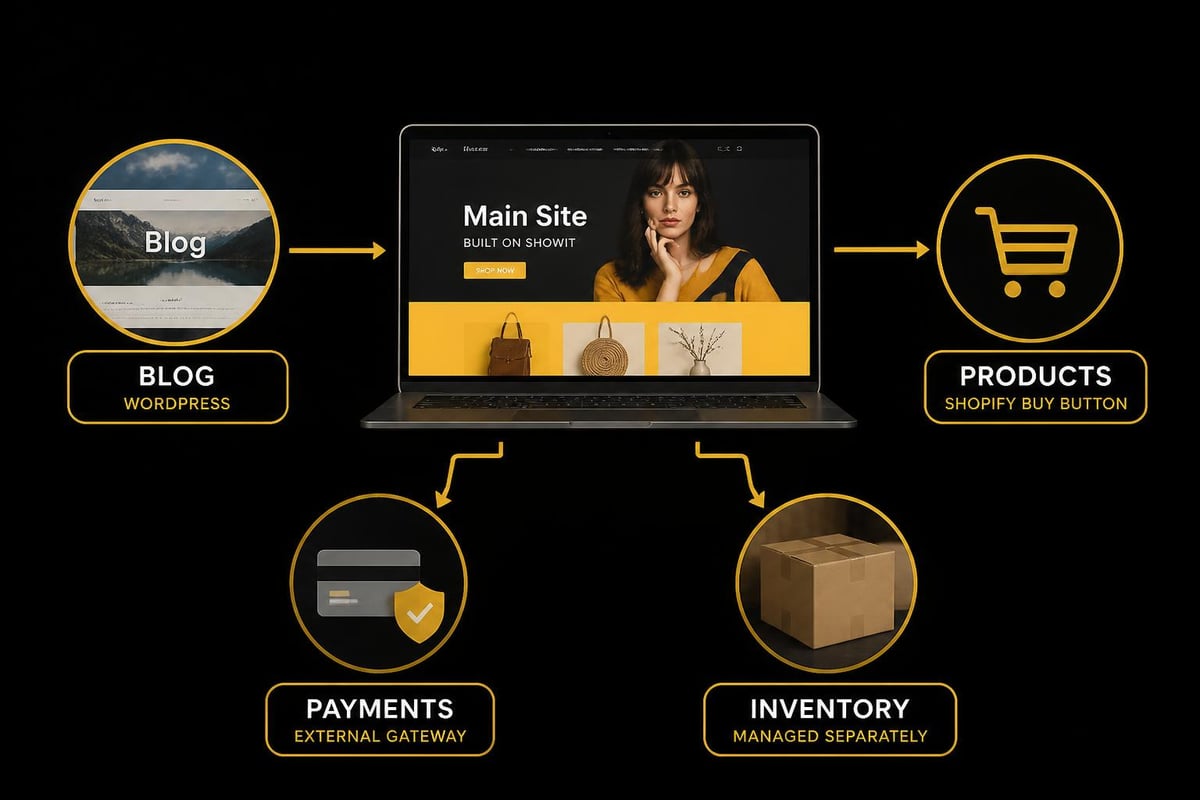
Showit doesn't have its own blogging system. Instead, it integrates with WordPress for blog functionality. Your main site runs on Showit, but your blog lives on WordPress. The two connect through your domain structure, typically using a subdomain or subdirectory.
This hybrid approach creates technical complexity. You're managing two platforms instead of one. Updates, security patches, and plugin compatibility become separate concerns. For businesses that rely heavily on content marketing, this split creates unnecessary friction.
Template Marketplace
The Showit template marketplace offers pre-designed starting points. These templates range in price from around $200 to $700 AUD. Quality varies significantly. Some templates deliver professional results with minimal customisation. Others require substantial work to make functional.
Templates give you a head start, but they don't eliminate the learning curve. You still need to understand how Showit works to customise effectively. And eCommerce-focused templates remain scarce compared to service business designs.
Where Showit Struggles with eCommerce
Here's where things get complicated for online stores.
Showit doesn't have native eCommerce functionality. The platform wasn't built to handle product catalogues, inventory management, or checkout processes. To sell products, you need third-party integrations.
The most common approach involves embedding Shopify's Buy Button or connecting other eCommerce platforms. This creates a fragmented experience. Your beautiful Showit site links to an external cart and checkout. Customers leave your branded environment to complete purchases.
Technical Limitations for Product-Based Businesses
Managing inventory across platforms creates operational headaches. Stock levels don't sync automatically between Showit and your eCommerce integration. You're manually updating information in multiple places or relying on complex workarounds.
Product page functionality remains limited. Features that eCommerce customers expect-variant selectors, size charts, product reviews, related items-require custom coding or don't work at all. Dear Kate Brand Strategy’s review notes that while Showit excels for service businesses, product-based businesses face significant constraints.
Payment gateway options narrow considerably. Unlike dedicated eCommerce platforms that support multiple payment providers natively, Showit relies on whatever your embedded cart offers. Australian businesses looking for local payment solutions may find themselves limited.
| Feature | Showit | Dedicated eCommerce Platform |
|---|---|---|
| Native product management | No | Yes |
| Inventory tracking | Through third-party only | Built-in |
| Checkout customisation | Limited | Extensive |
| Payment gateway options | Restricted | Multiple providers |
| Product variant handling | Complex workarounds | Native functionality |
| Customer accounts | Through integrations | Standard feature |
The Real Cost of Creative Freedom
Showit's pricing starts around $30 USD per month for basic plans. That's roughly $45 AUD monthly. Add WordPress hosting for your blog, third-party eCommerce tools, and any premium templates or plugins, and your actual monthly cost climbs significantly.
Compare this to platforms purpose-built for eCommerce. While creative control decreases, everything you need to run an online store comes included. No cobbling together different systems. No managing multiple platform subscriptions.
The hidden cost appears in time spent. Learning Showit's design system takes hours. Then learning how to integrate eCommerce functionality adds more hours. Then troubleshooting when those integrations don't behave as expected. For small business owners already stretched thin, this time investment rarely makes sense.
Who Showit Actually Serves Well
Despite eCommerce limitations, Showit thrives in specific contexts.
Service-based businesses with minimal product offerings benefit most. Wedding photographers, brand designers, consultants, and coaches need stunning portfolio sites. They might sell a handful of digital products or booking services, but eCommerce isn't their core business model.
Creative professionals who value visual brand expression over functional complexity find Showit appealing. If your website exists primarily to showcase work and attract clients, the platform delivers. The official Showit building guide demonstrates this focus clearly through its examples and use cases.
Businesses with budget for custom development can work around Showit's limitations. Hire a developer to build custom integrations and you can achieve more functionality. But now you're paying platform fees plus development costs plus maintenance. The economics rarely favour small businesses.
Alternative Paths for Australian eCommerce Businesses
If you're launching a product-based business, purpose-built solutions make more sense.
Platforms designed specifically for eCommerce handle the complexity you'll inevitably face. Product variants, inventory management, abandoned cart recovery, customer accounts-these features come standard. You're not patching together workarounds or hoping integrations continue working after updates.
The learning curve with dedicated eCommerce platforms still exists, but it's focused on selling products rather than design mechanics. Your time investment directly improves conversion rates and customer experience rather than aesthetic positioning.
For Australian businesses particularly, local support and payment integrations matter. Shopify development offers extensive local gateway options, Australian dollar pricing, and time-zone appropriate support. These practical considerations affect daily operations more than design flexibility.
Design Doesn't Require Showit's Complexity
Beautiful eCommerce sites exist on every platform. Professional themes and skilled developers create stunning results within platform constraints. The difference is that design serves commerce rather than complicating it.
Conversion-optimised design follows proven patterns. Navigation clarity, trust signals, clear calls-to-action, fast load times-these elements drive sales more than pixel-perfect positioning. Many Showit sites sacrifice usability for aesthetic impact, which works for portfolios but fails for eCommerce.
Making the Platform Decision
Start with your business model, not platform features.
Questions That Matter More Than Design Control
How many products will you sell? Ten items requires different infrastructure than 1,000 items. Will you offer product variants like sizes and colours? How often will inventory change? Do you plan to sell internationally or focus on Australia?
Your answers reveal which platform capabilities you actually need. Don't get distracted by features that sound impressive but don't match your business reality.
What's your technical comfort level? Be honest. If you struggle with basic tech tasks, adding platform complexity creates stress you don't need. Simpler tools with stronger support systems serve you better than powerful tools you can't operate effectively.
The Momentum Factor
Getting to market matters more than perfect design. Revenue comes from selling products, not endlessly refining layouts. Platforms with faster setup times get you selling sooner.
The Get Perfect Website guide walks through Showit setup comprehensively. Even following detailed instructions, expect weeks of work before launch. Compare this to streamlined eCommerce builds that can launch within four weeks with all essential functionality in place.
Momentum builds confidence and generates data. Your first design won't be your final design regardless of platform. Start with something functional, gather customer feedback, then improve based on real behaviour rather than assumptions.
What Showit Gets Right
Fair assessment requires acknowledging strengths.
The platform does deliver on design freedom for those who value it. If your brand identity depends on a highly specific visual presentation, Showit provides tools no template-based system matches. This matters tremendously for creative professionals whose website is their portfolio.
Customer support receives consistently positive reviews. The Showit Help Center offers extensive documentation. Response times are quick. The company clearly invests in helping users succeed within the platform's intended use cases.
The community around Showit is active and supportive. Facebook groups, YouTube tutorials, and template designers create an ecosystem of resources. The Startup Market’s tutorial exemplifies the quality guidance available from community members.
For businesses where these strengths align with needs, Showit works. Just recognise that eCommerce isn't where the platform shines.

The Technical Reality of Showit eCommerce
Integration limitations create practical problems.
When you embed Shopify's Buy Button into Showit, customers see a button that triggers a modal or redirects to checkout. This breaks the browsing flow. Users aren't staying on your beautifully designed product pages. They're jumping to a generic checkout interface.
Analytics tracking becomes fragmented. You're monitoring user behaviour across multiple platforms. Understanding where customers drop off in the buying journey requires combining data from different sources. Small businesses rarely have the analytics expertise to manage this complexity effectively.
SEO for product pages faces constraints too. While Showit allows meta descriptions and title tags, product page optimisation requires deeper control than the platform typically offers. Structured data, rich snippets, and technical SEO elements that help products rank remain difficult to implement properly.
Mobile commerce suffers particularly. While Showit gives you separate mobile designs, eCommerce functionality through integrations often doesn't optimise well for mobile screens. Checkout processes feel clunky. Cart management becomes awkward. In 2026, with mobile commerce representing the majority of online shopping, this creates real revenue impact.
The Four-Week Reality Check
Building a functional eCommerce store in four weeks on Showit is unrealistic for most businesses.
Learning the platform takes time. Creating both desktop and mobile designs doubles that time. Integrating eCommerce functionality adds complexity. Testing everything works correctly across devices and scenarios adds more time. Even with templates, customisation to match your brand and products extends timelines.
Dedicated eCommerce platforms compress this timeline dramatically. Pre-built functionality means less time configuring and more time adding products, writing descriptions, and setting up marketing. The Sweet Sea Digital review acknowledges that Showit's strength lies in design customisation for service businesses, not rapid eCommerce deployment.
For Australian small businesses with limited time and budget, this timeline difference matters enormously. Every week spent building means another week not selling. Revenue delayed is revenue lost.
Making Peace with Platform Limitations
Every platform has constraints. The question is whether those constraints align with what you're trying to build.
Showit constrains eCommerce functionality while freeing creative design. That trade-off works brilliantly for some businesses and catastrophically for others. Understanding which category you fall into prevents expensive mistakes.
Don't let stunning example sites seduce you into the wrong platform. Those showcase sites often represent dozens of hours of professional design work. They may feature minimal eCommerce functionality. They definitely don't reflect what you'll achieve in your first month on the platform.
Choose based on your primary business goal. If that goal is selling products efficiently, choose eCommerce infrastructure first and design second. If your goal is creative brand expression with minimal product sales, Showit's strengths may justify its eCommerce weaknesses.
The Support Question
Platform choice affects who helps you when things go wrong.
Showit support helps with the Showit platform. WordPress support helps with your blog. Your eCommerce integration has its own support channel. When something breaks at the intersection of these systems, getting help becomes complicated. Each support team points to the other platform as the likely source of the problem.
Compare this to working with specialists who understand your complete stack. Integrated platforms mean clearer accountability. When checkout stops working, there's one support channel to contact, not three.
Australian businesses particularly benefit from local support. Time zone alignment means faster responses. Cultural context means better understanding of your specific needs and market conditions. These practical considerations affect your ability to solve problems quickly and keep selling.
Beyond the Website Builder Debate
Your website is infrastructure, not your business.
The platform matters less than what you do with it. Strong product photography, compelling copy, clear value propositions, and excellent customer service drive success regardless of platform. Weak products and poor marketing fail on every platform including the most expensive and sophisticated.
Focus energy on elements that differentiate your business. Unique products. Better customer experience. Faster shipping. More helpful content. These create competitive advantage. Platform choice simply enables or constrains your ability to deliver these differentiators.
For most Australian eCommerce businesses, Showit constrains more than it enables. The platform wasn't built for your use case. That's not a criticism of Showit, it's a recognition of fit.
Showit delivers creative freedom for service-based businesses and portfolios, but it creates unnecessary complexity for product-based eCommerce. Australian small businesses need infrastructure that prioritises conversion and operational efficiency over pixel-perfect design control. If you're ready to build an online store that actually sells rather than just looks impressive, Kida Digital specialises in conversion-led Shopify development that gets Australian eCommerce businesses from concept to launch in four weeks with everything you need to start selling.


Be the first to comment