

You don't need a $15,000 budget to get a website that converts. That's the truth most web agencies won't tell you. For small Australian businesses in 2026, affordable web design for small business isn't about choosing the cheapest option. It's about understanding what you actually need, what you can skip, and where to invest your limited resources for the best return. This guide cuts through the noise to show you exactly how to get a professional online presence without the agency price tag.
What Affordable Actually Means in 2026
Affordable doesn't mean cheap. It means proportional to your business size and revenue.
A café turning over $300,000 annually has different website needs than a $2 million eCommerce store. The mistake most small business owners make is comparing their requirements to enterprises with dedicated marketing teams.
Affordable web design for small business in 2026 falls into three distinct tiers:
- DIY platforms: $20-50/month for subscription-based builders
- Template customisation: $500-2,500 one-time setup with ongoing hosting
- Professional development: $3,000-8,000 for custom builds with strategic planning
The gap between these options isn't just price. It's time investment, technical capability, and business complexity.
A retail store selling 50 products has fundamentally different requirements than a service business with a contact form. Your choice should reflect your actual business model, not just your budget.
The True Cost Beyond the Price Tag
Every web design option carries hidden costs that surface later.
DIY platforms look affordable at $29/month until you need custom functionality. Then you're paying for apps, plugins, and workarounds that add up to hundreds annually. Template customisation seems reasonable until you realise you've spent 40 hours watching YouTube tutorials instead of serving customers.

Professional development feels expensive upfront but includes strategy, structure, and systems that DIY approaches miss entirely.
The question isn't which option costs less. It's which option costs you less in total resources over 12 months.
Platform Options That Actually Work for Small Budgets
Not all website builders deserve your attention in 2026.
The market is saturated with options, but only a handful serve small Australian businesses well. Most website builders in 2026 focus on either complete beginners or enterprise clients, leaving small businesses in an awkward middle ground.
Shopify for Product-Based Businesses
If you're selling physical products, Shopify remains the most reliable platform for affordable web design for small business operations.
The basic plan starts at $49 AUD monthly. You get hosting, security, payment processing, and inventory management included. No separate bills for SSL certificates or database management.
Why Shopify works for budget-conscious retailers:
- Transaction fees decrease as you grow
- Australian payment gateway integration is seamless
- App ecosystem solves specific problems without custom code
- Mobile responsiveness is standard, not optional
The platform handles 99% of what small eCommerce businesses need out of the box. You're not paying for features you'll never use or missing critical functionality that requires expensive custom development.
WordPress for Service Businesses
Service-based businesses often overcomplicate their web presence.
You don't need membership areas, complex booking systems, or automated funnels when you're starting. WordPress with a quality theme costs $15/month for hosting plus $100-300 for the theme itself.
This combination gives you complete control without the technical overhead of managing servers. Modern WordPress themes from providers like Astra or GeneratePress include page builders that bridge the gap between DIY simplicity and professional design.
The learning curve is steeper than drag-and-drop builders, but the long-term flexibility justifies the initial time investment for businesses planning to scale.
Squarespace and Wix for Simple Presence
Sometimes you just need to exist online professionally.
Squarespace and Wix excel at this specific use case. They're not the best for eCommerce at scale or complex functionality, but for service businesses needing attractive portfolios and contact forms, they're perfectly adequate.
Pricing sits between $25-45 monthly depending on features. You're trading customisation limits for simplicity and support. That's a reasonable trade for businesses where the website is a digital business card rather than a revenue driver.
Exploring alternatives to Wix reveals options like Webflow or Editor X for businesses that outgrow basic builders but aren't ready for full custom development.
Strategic Corners You Can Cut Without Damage
Smart budget allocation means knowing where to save and where to spend.
Not every website element drives revenue. Some features exist because competitors have them, not because customers need them.
Features You Can Launch Without
Most small business websites include elements that never get used.
Skip these on day one:
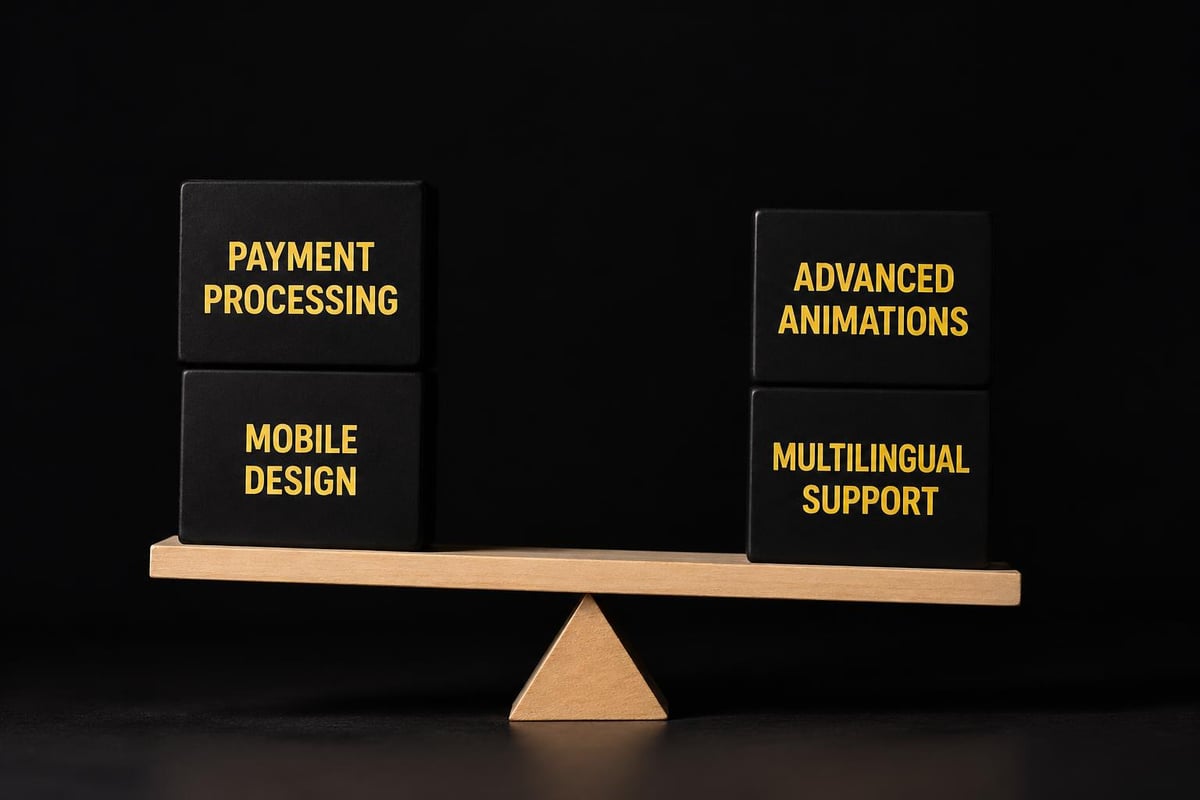
- Live chat widgets (use email until you have consistent traffic)
- Complex animation and parallax scrolling (slower load times for minimal benefit)
- Multiple language versions (wait for data showing demand)
- Blog sections you won't maintain (empty blogs hurt credibility)
- Advanced booking systems (start with phone calls or email)
Each skipped feature saves development time and ongoing maintenance. You can always add functionality later when revenue justifies the investment.
Templates Versus Custom Design
Custom design sounds appealing until you see the price difference.
Quality templates in 2026 cost $50-150. Custom design starts at $2,000 and easily reaches $8,000 for comprehensive branding. The visual difference matters less than most business owners think.
Research from the Baymard Institute shows that trust factors like clear product information and straightforward navigation impact conversion rates far more than unique visual design. Your $89 template combined with professional product photography and clear messaging outperforms a custom design with poor content every time.
Reserve custom design for businesses where visual differentiation is a primary competitive advantage, like fashion brands or luxury services.
DIY Content Creation
Professional copywriting adds $1,000-3,000 to web design projects.
You can write your own content if you follow a proven structure. Start with customer language, not industry jargon. Focus each page on answering one specific question your customers ask.
Simple content framework for affordable web design for small business projects:
- What you offer (be specific)
- Who it's for (be narrow)
- Why it matters (customer benefit, not feature list)
- How to get started (clear next step)
This approach isn't as polished as professional copywriting, but it's infinitely better than template placeholder text or vague descriptions. You can refine the messaging later once you've validated what resonates with actual customers.
When Professional Help Becomes Essential
Some corners can't be cut without serious consequences.
Certain business models and growth stages demand professional expertise. Trying to DIY these scenarios wastes more money than it saves.
eCommerce Stores With Inventory Complexity
Selling products online requires systems, not just pretty pages.
If you're managing variants (sizes, colours, materials), inventory across multiple locations, or integration with existing retail systems, professional development isn't optional. One misconfigured product setup can mean lost sales or fulfilment errors that damage customer relationships.
Understanding Shopify case studies reveals how professional setup prevents costly mistakes in inventory management, tax configuration, and shipping calculations. The $5,000 you invest upfront prevents $15,000 in lost revenue and customer service nightmares.
Businesses Where Website IS the Business Model
Digital product sellers, online course creators, and membership sites can't treat their website as an afterthought.
Your entire revenue stream depends on seamless user experience, payment processing, and content delivery. Template limitations create friction that directly impacts income. Professional development ensures every user journey is optimised for conversion.
Compliance-Heavy Industries
Healthcare, finance, and legal services face regulatory requirements that generic templates don't address.
Privacy policies, accessibility standards, and data handling protocols need proper implementation. Getting these wrong exposes your business to legal risk that far exceeds any web design savings.
Professional developers in these niches understand compliance requirements and build them into the foundation rather than bolting them on later.
Maximising ROI on Your Web Design Investment
Every dollar you spend should generate measurable returns.
Affordable web design for small business isn't about minimising cost. It's about maximising value per dollar invested.
Start With Analytics From Day One
Google Analytics 4 is free. Google Search Console is free. Both provide insights that guide your web investment decisions.
Before spending on redesigns or additional features, look at actual user behaviour. Which pages do visitors leave from? Where do they spend the most time? What search terms bring qualified traffic?
This data shows you exactly where to invest next. Maybe your product pages convert well but nobody finds them. SEO investment beats design refinement. Maybe your homepage engages visitors but your checkout process loses them. Streamlining the purchase flow matters more than adding features.
Mobile Performance Matters More Than Desktop Polish
In 2026, mobile traffic accounts for 63% of all web visits in Australia. Your website's mobile experience directly impacts revenue for most small businesses.
Page load speed affects both user experience and search rankings. Google's Core Web Vitals penalise slow sites regardless of how beautiful they look on desktop. A fast, functional mobile site outperforms a gorgeous desktop design that loads slowly on phones.
Test your site on actual devices, not just responsive preview modes. Different screen sizes and connection speeds reveal issues that desktop testing misses.
Conversion Rate Trumps Traffic Volume
Most small businesses obsess over visitor numbers instead of visitor actions.
A website with 500 monthly visitors and a 5% conversion rate (25 leads or sales) outperforms a site with 2,000 visitors and a 1% conversion rate (20 conversions). Focus on making it easier for interested visitors to take action before worrying about driving more traffic.
Simple conversion optimisations that cost nothing:
- Clear calls-to-action above the fold
- Removal of navigation options on checkout pages
- Trust signals (testimonials, security badges, return policy)
- Simplified contact forms (fewer fields = more completions)
These changes take hours to implement but can double your website's business impact overnight.
Building for Growth Without Overspending Now
Future-proofing doesn't require building for your five-year vision today.
Smart affordable web design for small business projects balance immediate needs with reasonable scalability.
Choose Platforms That Scale With You
Some platforms trap you in their ecosystem. Others give you migration paths as you grow.
| Platform | Growth Flexibility | Migration Difficulty | Best For |
|---|---|---|---|
| Shopify | Excellent (Shopify Plus) | Moderate | Product businesses |
| WordPress | Excellent | Low | Service businesses |
| Wix | Limited | High | Simple presence |
| Squarespace | Moderate | Moderate | Portfolios |
The platform you choose at $50,000 annual revenue should still work at $500,000 without a complete rebuild. Shopify's architecture supports businesses from first sale through to eight-figure revenue. WordPress scales from basic blogs to major media publications.
Wix and Squarespace hit ceilings faster, making them better suited for businesses where the website supports operations rather than driving them.
Build Core Pages Right, Add Features Later
Your website needs three things to function: clarity about what you offer, proof you're legitimate, and a way to contact or purchase.
Everything else is enhancement. Launch with strong home, product/service, and contact pages. Add team pages, detailed about sections, and resource libraries as you validate demand for them.
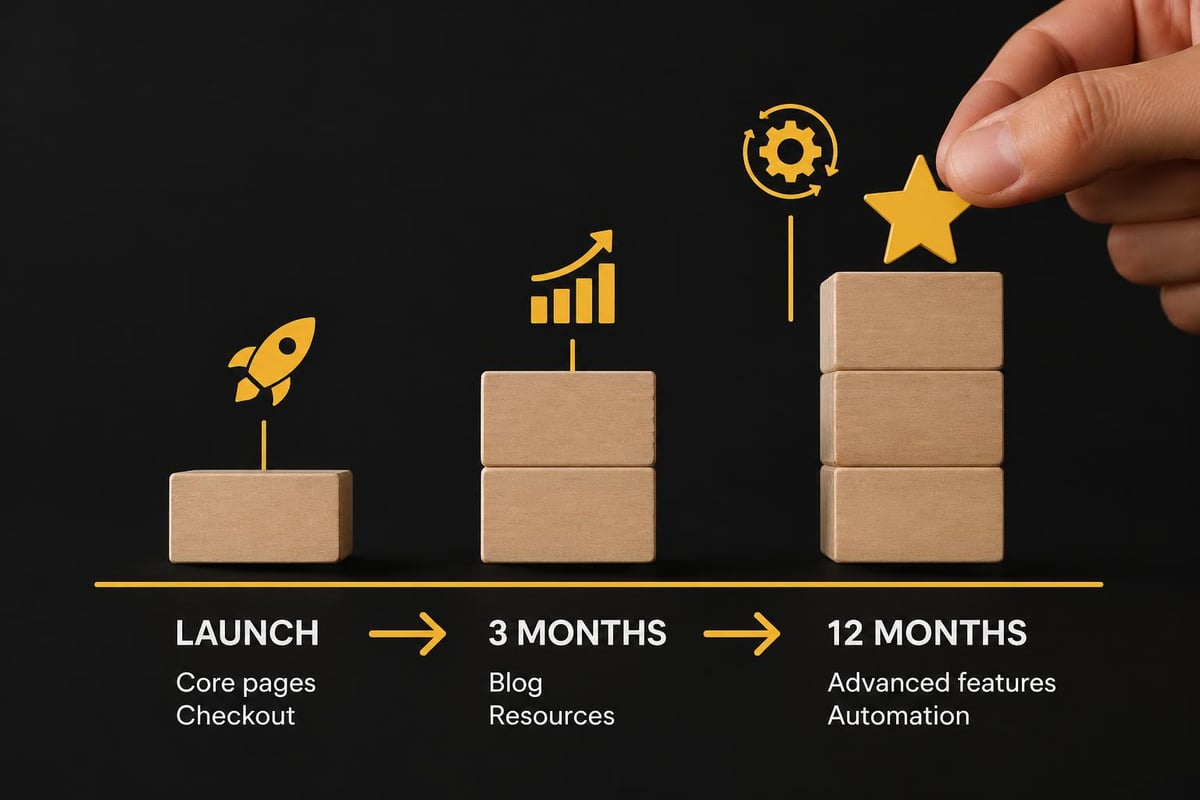
This phased approach spreads costs over time and ensures you're investing based on actual business performance rather than optimistic projections.
Track What Actually Matters
Vanity metrics feel good but don't pay bills.
Total page views, bounce rate, and time on site matter less than leads generated, sales completed, and customer acquisition cost. Set up conversion tracking for specific actions that indicate business success.
For eCommerce, that's purchases and email signups. For service businesses, that's contact form submissions and phone calls. For B2B, that's demo requests and quote inquiries.
When you can trace revenue back to specific website changes, you make smarter investment decisions.
The Real Timeline for Affordable Web Design
Speed costs money, but unnecessary delays cost opportunity.
Understanding realistic timelines prevents both rushed launches and analysis paralysis.
DIY builders take 2-6 weeks depending on your technical comfort and available time. That's calendar time, not hours invested. Most business owners underestimate by half because they can only work on their website in fragmented blocks between running their actual business.
Template customisation requires 4-8 weeks including content creation, setup, and testing. Professional developers working on your template can compress this to 2-3 weeks because it's their only focus.
Custom development spans 6-12 weeks for small business projects, though streamlined processes can deliver in four weeks when scope is clearly defined. The four-week Shopify build approach eliminates common delays by working within defined parameters rather than endless customisation.
Faster timelines require clearer decision-making and content readiness before development starts.
Content Preparation Determines Speed
Developers waiting for product descriptions, brand photos, or business copy adds weeks to any timeline.
Prepare this before engaging any designer or developer:
- All written content in final or near-final form
- High-quality images (product photos, team headshots, location images)
- Brand assets (logos, colour codes, fonts)
- Clear list of required functionalities with priority ranking
This preparation work feels tedious but prevents the stop-start rhythm that doubles project timelines. It also forces you to clarify exactly what you need rather than figuring it out during development when changes cost more.
Getting SEO Right Without Extra Cost
Search visibility shouldn't require a separate budget for affordable web design for small business projects.
Basic SEO practices belong in every website build. They cost nothing extra when implemented from the start.
Modern platforms like Shopify and WordPress handle technical SEO fundamentals automatically. You get clean URL structures, mobile responsiveness, fast hosting, and XML sitemaps without additional configuration.
Your responsibility covers content-level SEO:
- Descriptive page titles that include relevant keywords
- Meta descriptions that encourage clicks from search results
- Header tags that structure content logically
- Image alt text that describes visuals for accessibility and search
These practices require no technical skills, just clear thinking about what your customers search for. Understanding SEO optimisation for product pages shows how content structure impacts both search visibility and conversion rates.
Avoid paying for SEO audits or optimisation until you've implemented these basics yourself. Many "SEO packages" charge for changes you can make in minutes once you understand what's needed.
Local SEO for Physical Businesses
If you serve customers in person, local search optimisation drives tangible revenue.
Google Business Profile listing is free and appears in local search results and Google Maps. Complete your profile with accurate hours, photos, services, and regular updates. This often generates more immediate business than your website.
On your website, include your specific service area in content naturally. "Plumber in Manly" or "Brunswick florist" signals relevance to local searchers. Add your business address in the footer and create location-specific pages if you serve multiple areas.
These tactics cost nothing but dramatically improve visibility for customers searching locally.
Avoiding the Template Trap
Templates solve design problems but create strategy gaps.
The biggest weakness in affordable web design for small business isn't visual limitations. It's the lack of strategic thinking about customer journeys, unique value propositions, and conversion optimisation.
Templates give you pages. They don't give you messaging, positioning, or understanding of what makes your business worth choosing over competitors. That's your job, and it's where most DIY websites fail.
Before customising any template, answer these questions:
- What specific problem do we solve better than anyone else?
- What objection prevents our ideal customer from buying immediately?
- What proof can we offer that we'll deliver as promised?
- What's the simplest next step for someone interested but not ready to commit?
Your answers should guide every design and content decision. A template can look professional but still fail if it doesn't communicate what makes you different and worth trusting.
When Templates Work Perfectly
Templates excel for businesses in mature, well-understood industries.
If you're a dentist, accountant, or cafe, customer expectations are established. They know what services you offer and what a professional business in your industry looks like. Templates meet those expectations efficiently.
Trying to look dramatically different often creates confusion rather than intrigue. Save customisation budget for elements that directly impact conversion: better photos, clearer service descriptions, stronger testimonials.
When Templates Create Problems
Unique business models struggle with pre-built structures.
If you offer something new or combine services in unusual ways, templates force you into categories that don't fit. You spend more time fighting the template's assumptions than benefiting from its design work.
Hybrid businesses (retail plus subscription, product plus service, B2B plus B2C) particularly struggle because templates assume one business model and customer type.
In these cases, investing in professional development or choosing more flexible platforms like WordPress provides better long-term value despite higher upfront costs.
Making Content Creation Manageable
Empty websites help nobody, but creating content feels overwhelming.
Professional copywriters charge $150-300 per page. For a ten-page site, that's $1,500-3,000 added to your budget. You can write adequate content yourself by following structures rather than starting from blank pages.
Simple page templates for common business pages:
Homepage: One-sentence promise → Three benefit points → Social proof → Clear next step
Services/Products: Specific problem → How this solves it → What's included → Pricing/investment → How to start
About: Brief origin story → Relevant experience/credentials → Why this matters to customers → Personal touch
These frameworks ensure you cover essential information without writing novel-length pages. Aim for 200-400 words per page initially. You can expand later based on customer questions and search data showing what people want to know.
For small business eCommerce, product descriptions matter more than company history. Invest time there first.
The Power of Starting Simple
Launch with complete but concise content rather than waiting for perfection.
A live website with room for improvement beats an offline "coming soon" page indefinitely. You'll learn more in one month of customer feedback than six months of theoretical planning.
Using platforms like RankPill can help you maintain a content publishing schedule once your site is live, particularly for blog posts that support SEO without requiring constant creative effort. The AI-driven approach ensures consistency in your content marketing without demanding daily attention.
Professional Development That Fits Small Budgets
Not all developers charge enterprise rates.
Finding the right development partner means understanding what drives pricing and where you can negotiate scope without sacrificing quality.
Understanding why agencies charge premium rates reveals opportunities for affordable alternatives. Large agencies carry overhead for account managers, creative teams, and project managers. These costs get passed to clients regardless of project size.
Specialised developers focused on specific platforms often deliver better value for small businesses. They've built similar sites dozens of times, making them efficient at common requirements while avoiding expensive experimentation at your expense.
Questions to Ask Before Hiring
Vetting developers prevents expensive mistakes and mismatched expectations.
- What's included in your quoted price? (hosting, domain, training, revisions)
- What happens after launch if I need changes? (support policies, hourly rates)
- Who actually owns the finished website? (ensure you retain full ownership)
- How do you handle content creation? (who writes what)
- What's your process if I'm unhappy with results? (revision policies, guarantees)
Developers with clear answers and documented processes reduce risk. Vague responses or reluctance to commit to specifics signal potential problems.
The Value of Defined Packages
Open-ended projects balloon in cost.
Defined packages with specific deliverables protect both you and the developer. You know exactly what you're getting, and they know exactly what they're building.
Structured Shopify builds that move from concept to launch in four weeks demonstrate how defined scope accelerates timelines and controls costs. When everyone knows the boundaries, decisions happen faster and projects stay on budget.
Custom projects require more planning but allow greater flexibility for unusual requirements. Choose based on how well your business fits standard patterns.
Affordable web design for small business in 2026 isn't about finding the cheapest option or doing everything yourself. It's about strategic investment in what actually drives business results while skipping expensive elements that look impressive but don't convert visitors to customers. Whether you choose DIY platforms, template customisation, or professional development depends on your business model, available time, and growth trajectory. If you're launching an Australian eCommerce store and want professional results without agency pricing or endless DIY learning curves, Kida Digital specialises in conversion-focused Shopify builds that launch in four weeks with everything you need to start selling immediately.


Be the first to comment