

Running a Shopify store means dealing with unexpected issues at the worst possible times. Payment gateways fail during flash sales. Product pages break after theme updates. Shipping integrations stop syncing overnight. When your store's down and revenue's at stake, you need answers fast. Knowing when and how to call Shopify support can mean the difference between a minor hiccup and a full-blown crisis that costs you real money.
Understanding What Shopify Support Actually Covers
Not every problem warrants direct contact with Shopify's team.
Their support exists to help with platform-specific issues, billing questions, and technical problems with core Shopify features. They'll troubleshoot payment processing errors, explain plan limitations, and guide you through admin settings you can't navigate alone.
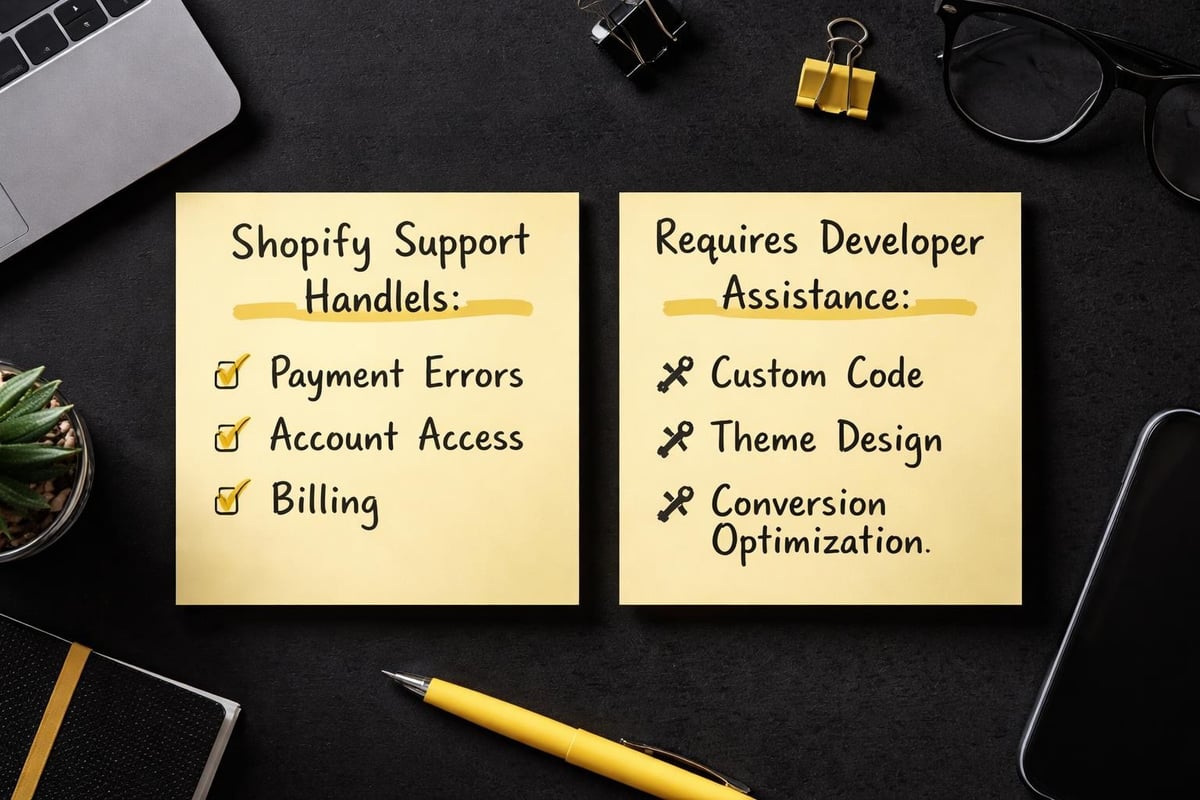
What Shopify support handles:
- Payment gateway configuration and errors
- Checkout and cart functionality issues
- Domain connection and SSL problems
- Account access and billing disputes
- Core theme functionality problems
- App conflicts with native Shopify features
What they won't do is build your store for you. They won't customize your theme code, design your product pages, or optimize your conversion rates. That falls outside their scope.
Third-party app issues get redirected to the app developer. Custom code troubleshooting isn't their responsibility. Store design work and marketing strategy advice aren't part of their service offering.
Understanding these boundaries saves you time and frustration when you actually need to call Shopify support.
When You Should Actually Contact Shopify
Some situations demand immediate intervention from the platform itself.
Critical scenarios requiring Shopify support:
- Your checkout stops processing payments completely
- Your entire store goes offline unexpectedly
- You're locked out of your admin account
- Unauthorized charges appear on your Shopify billing
- Your domain suddenly stops pointing to your store
- Tax calculations are applying incorrectly across orders
A 2024 survey of eCommerce merchants found that 68% waited too long before contacting support, trying to fix platform-level issues themselves and losing revenue in the process.
Payment failures represent the most urgent category. Every minute your checkout doesn't work costs you potential sales. Customer care best practices emphasize speed for revenue-impacting issues.
Account access problems come second. Being locked out during peak trading periods creates cascading problems you can't solve alone.
Less urgent but still important are billing discrepancies, feature questions, and performance concerns. These deserve attention but rarely require immediate phone contact.
When dealing with Shopify-specific technical challenges, knowing how to contact Shopify support properly through the right channels speeds up resolution significantly.
The Fastest Ways to Reach Shopify Support
Shopify offers multiple contact methods, each with different response times and availability.
| Contact Method | Availability | Response Time | Best For |
|---|---|---|---|
| Live Chat | 24/7 | Under 5 minutes | Urgent technical issues |
| Phone Support | 24/7 | Immediate | Critical store failures |
| Email Support | 24/7 | 24-48 hours | Non-urgent questions |
| Help Center | Always | Self-service | Common problems |
Live chat through your Shopify admin typically provides the fastest resolution for most issues. Support staff can access your store settings, review error logs, and implement fixes while you watch.
To call Shopify support via phone, you'll find regional numbers through their official contact page. Australian merchants can access local support during business hours, with 24/7 coverage through international lines.
The official Shopify contact page provides the most current phone numbers and regional availability. Numbers change occasionally, so always verify through official channels rather than third-party websites.
Email works well for complex issues requiring screenshots, error messages, or detailed explanations. Response times vary by plan tier and issue urgency.
Higher-tier plans get priority support. Shopify Plus merchants receive dedicated support teams with faster response guarantees.
Preparing Before You Contact Support
Walking into a support conversation unprepared wastes everyone's time.
Gather specific information before you call Shopify support or start a chat session:
Essential information to collect:
- Your exact Shopify plan name
- The specific feature or page causing problems
- Recent changes you made to your store
- Screenshots of error messages
- Steps to reproduce the issue
- Browser and device details
Document when the problem started. "Yesterday afternoon" helps less than "April 13, 2026 at 2:47 PM AEST after updating the Dawn theme."
Clear reproduction steps matter enormously. "My product page is broken" gets slower help than "When customers select the blue variant on product X, the add-to-cart button disappears."
Understanding proper Shopify support communication means presenting problems systematically so support staff can diagnose quickly.
Testing in incognito mode rules out browser cache issues. Trying different devices confirms whether problems are universal or local.
Having your Shopify admin open during the conversation lets you implement suggested fixes immediately and confirm whether solutions work.
What Happens When You Call Shopify Support
The actual support experience varies by issue complexity and your plan level.
Initial contact starts with verification. Support staff confirm your identity through store details, email addresses, or account information. This protects your store from unauthorized access.
You'll describe the problem in your own words. Support agents ask clarifying questions to narrow down potential causes.
For technical issues, they'll often request screen-sharing access or ask you to navigate to specific admin pages. This lets them see exactly what you're seeing.
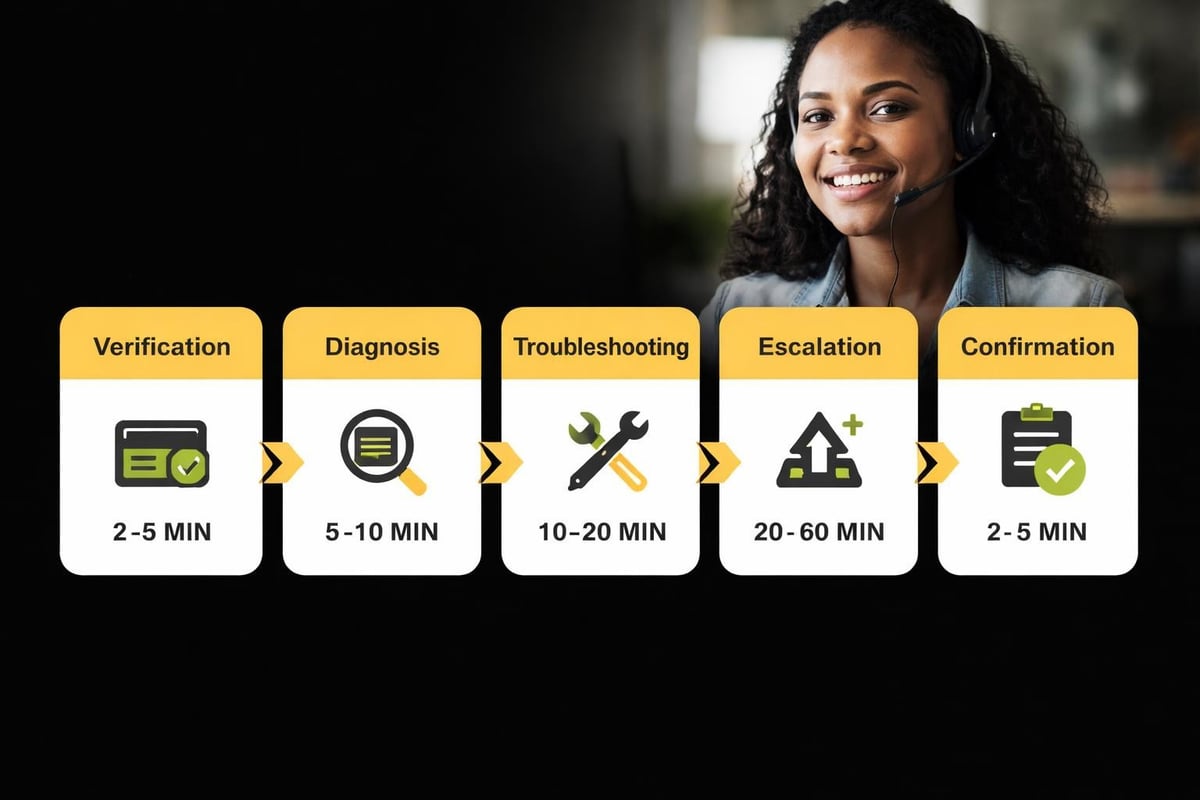
Typical support call progression:
- Identity verification and store confirmation
- Problem description and clarification questions
- Initial diagnostic checks from the agent's side
- Guided troubleshooting steps you perform together
- Solution implementation or escalation to technical teams
- Confirmation that the issue is resolved
Simple problems like password resets or billing questions resolve in minutes. Complex technical issues might require escalation to specialized teams, extending resolution to hours or days.
When immediate fixes aren't possible, support creates tickets that track progress. You'll receive follow-up emails with updates and next steps.
Australian merchants appreciate that Shopify's 24/7 support covers our time zones, though peak hours can mean longer wait times.
Common Issues Support Resolves Quickly
Certain problems have standardized solutions that support teams handle routinely.
Domain connection issues typically resolve within one support session. Agents walk you through DNS settings, verify propagation, and confirm your store loads correctly on your custom domain.
Payment gateway configuration problems often stem from incorrect API credentials or incomplete setup steps. Support can review your settings against platform requirements and spot missing elements.
App conflicts causing checkout errors get diagnosed through systematic elimination. Support helps identify which app creates the conflict and suggests alternatives or workarounds.
Shipping rate calculation errors usually trace to zone configuration or carrier integration settings. Agents can review your shipping setup and identify misconfigured rules.
Tax setting problems frequently result from conflicting automated tax services or incorrect regional settings. Support clarifies how Shopify applies tax rules and helps align settings with your requirements.
For small Australian eCommerce businesses just starting out, these technical hurdles can feel overwhelming. That's partly why done-for-you Shopify builds exist as an alternative to navigating platform complexities alone.
When Support Can't Help (And What to Do Instead)
Some problems fall outside Shopify support's scope entirely.
Custom code issues require developer assistance. If you've modified theme files, added custom liquid code, or installed complex scripts, Shopify support won't debug your custom work.
Third-party app problems need the app developer's attention. Shopify can't fix bugs in apps they don't build or maintain.
Problems requiring external help:
- Custom theme design and layout changes
- Conversion rate optimization and UX improvements
- Advanced SEO implementation beyond basic settings
- Marketing automation and strategy development
- Product photography and content creation
- Complex shipping workflow customization
Store performance optimization often needs specialist expertise. While support can identify obvious issues, improving page speed or conversion rates requires strategic technical work.
Business strategy questions aren't in Shopify support's wheelhouse. They'll explain platform capabilities but won't advise whether you should expand into new markets or adjust your pricing strategy.
When you need to call Shopify support for technical platform issues but also require strategic eCommerce guidance, you're looking at different service categories entirely.
Shopify developer support covers scenarios where platform support ends and specialist development begins.
Making Support Conversations More Productive
How you communicate determines how quickly problems get solved.
Be specific rather than general. "Customers can't check out" works better than "My store is broken."
Provide context about timing. "This started after I installed App X" helps more than "It's been happening for a while."
Communication tips that speed up resolution:
- Start with the specific action that fails
- Mention recent changes to your store
- Include error messages word-for-word
- Describe what you've already tried
- State your timezone for follow-up coordination
Stay focused on one issue per conversation. Multiple unrelated problems in a single ticket slow down everyone involved.
If you're technical, mention relevant details like theme versions, app versions, or browser console errors. If you're not, that's fine too – just describe what you observe.
Follow the agent's instructions completely before reporting results. Skipping troubleshooting steps leads to circular conversations.
Research from 2025 shows that well-prepared merchants resolve support issues 3.2 times faster than those who contact support without documentation.
Best practices for Shopify customer support emphasize clear communication and systematic problem-solving on both sides of the conversation.
Regional Support Considerations for Australian Merchants
Location affects your support experience in subtle ways.
Australian business hours align reasonably well with Shopify's 24/7 coverage. You'll rarely wait for support availability, though high-traffic periods can increase queue times.
Payment gateway options for Australian stores require specific configuration. Support teams familiar with regional requirements can guide you through Australian payment processor setup more effectively.
Shipping integrations with Australia Post, Sendle, and other local carriers sometimes need particular attention during setup. Asking support about Australian-specific shipping features saves trial-and-error.
Tax implications for GST collection need careful handling. While Shopify calculates taxes automatically, confirming your settings align with ATO requirements matters.
Currency display and conversion settings affect how Australian customers see prices. Support can verify that your localization settings serve your primary market correctly.
Most Shopify support staff understand Australian business contexts well. You won't need to explain basics about GST, Australian consumer law, or regional payment preferences.
When building an eCommerce store specifically for the Australian market, regional configuration details make a meaningful difference to customer experience.

Alternatives When You Need More Than Support Can Offer
Platform support solves platform problems, but store success requires broader expertise.
When you need professional development help:
- Your theme needs custom functionality beyond templates
- Conversion rates disappoint despite traffic growth
- App integrations require complex customization
- Your store structure needs strategic reorganization
- Performance optimization requires technical intervention
Shopify Partners and independent developers fill the gap between support services and comprehensive store development.
The Shopify Help Center offers self-service resources for learning platform features, but actual implementation still falls on you.
Many Australian merchants start with DIY approaches, then hit walls where platform knowledge intersects with strategic business requirements.
Support can explain how features work. They can't redesign your customer journey for better conversions.
They'll troubleshoot technical errors. They won't analyze why your bounce rate sits at 73%.
Knowing when to call Shopify support versus when to engage specialist development expertise comes down to distinguishing platform issues from business optimization needs.
Shopify website building encompasses both technical platform setup and strategic conversion design – two different skill sets entirely.
Creating Your Own Support Documentation
Smart merchants maintain internal records of resolved issues.
Worth documenting for future reference:
- Solutions to recurring problems
- Custom settings and their purposes
- App configurations that work for your needs
- Workarounds for known limitations
- Contact names for particularly helpful support agents
When similar issues resurface months later, your notes provide instant answers without another support conversation.
Screenshot important settings pages. Document the logic behind specific configurations.
Record which apps work well together and which create conflicts in your particular setup.
Note seasonal adjustments to shipping rules or promotional discounts that support helped configure.
This internal knowledge base becomes especially valuable as your team grows. New staff members can reference resolved issues without repeating the same support conversations.
It also helps when you do call Shopify support again. Referencing previous ticket numbers or describing past solutions gives agents context that speeds up diagnostics.
What Your Shopify Plan Means for Support Access
Support quality and availability vary by subscription tier.
| Plan Level | Phone Support | Chat Priority | Email Response | Account Manager |
|---|---|---|---|---|
| Basic | Yes | Standard | 24-48 hours | No |
| Shopify | Yes | Standard | 24-48 hours | No |
| Advanced | Yes | Higher | Under 24 hours | No |
| Plus | Yes | Priority | Under 12 hours | Yes |
Basic and standard Shopify plans receive full 24/7 support access but no queue priority. You'll wait behind higher-tier merchants during busy periods.
Advanced plan merchants get slightly faster response times and higher priority in support queues.
Shopify Plus customers receive dedicated account management, priority support access, and guaranteed response times for critical issues.
While support quality remains consistent across plans, response speed and access to specialized help increase with tier.
For most small Australian businesses, standard plan support proves entirely adequate. You're not competing with enterprise stores for basic technical assistance.
Upgrading plans purely for better support rarely makes financial sense. Upgrade when the plan's features justify the cost, with improved support as a bonus.
Understanding Shopify plan differences helps set realistic expectations for support experiences.
Building Support Skills Into Your Team
Growing stores eventually need multiple people who can handle support conversations.
Train team members on which issues require platform support versus internal troubleshooting. Not every problem needs Shopify involvement.
Create clear escalation paths. Define which staff members handle what types of issues before contacting support.
Team support training should cover:
- Common problems and their quick fixes
- When to attempt solutions internally
- How to document issues for support tickets
- Which information support typically requests
- Follow-up processes for unresolved tickets
Empower staff to solve routine problems without external help. This reduces dependency on support for simple questions.
Designate one or two people as primary support contacts who develop relationships with Shopify teams over time. Consistency helps.
For very small operations where you're the entire team, developing troubleshooting instincts means distinguishing urgent from non-urgent issues before you call Shopify support.
Time spent on hold matters when you're running everything yourself. Choose your battles wisely.
Tracking Support Performance Over Time
Monitor how often you need platform support and for what reasons.
Frequent contacts about the same issues suggest underlying problems that need permanent solutions rather than repeated troubleshooting.
If you're calling Shopify support weekly about app conflicts, you might need better app vetting processes or alternative solutions.
Recurring payment gateway issues could indicate a fundamental configuration problem or an unsuitable payment processor for your business model.
Pattern recognition helps you invest in preventive measures rather than reactive support conversations.
Support metrics worth tracking:
- Average issues per month
- Issue categories and frequency
- Average resolution time by issue type
- Problems requiring escalation versus quick fixes
- Seasonal patterns in support needs
This data informs strategic decisions about store infrastructure, app choices, and team capability development.
It also highlights whether you're operating within normal parameters or experiencing abnormal technical instability.
Most established stores contact support occasionally for genuine platform issues but handle day-to-day operations independently.
If you're leaning heavily on support for routine questions, you might benefit from structured training or professional development assistance rather than continued platform support dependency.
Moving Forward With Platform Confidence
Knowing when and how to call Shopify support represents just one piece of running a successful online store.
The platform itself provides robust tools and reliable infrastructure. Support teams solve platform-specific problems competently when you need them.
But store success extends far beyond platform functionality. Strategic design, conversion optimization, and technical implementation require expertise that complements platform support rather than replacing it.
Small Australian eCommerce businesses face unique pressures balancing limited resources against competitive market demands. Getting stuck on technical issues costs both time and revenue.
Smart merchants distinguish platform problems from business optimization needs, engaging the right resources for each category.
Understanding when to call Shopify support versus when you need strategic development expertise keeps your store moving forward without wasting time on the wrong solutions. Kida Digital builds conversion-focused Shopify stores for small Australian businesses in four weeks, handling everything from technical setup to strategic design so you can focus on selling rather than troubleshooting. If you're ready to launch properly or upgrade from a DIY setup that's holding you back, let's talk about building a store that works.


Be the first to comment